


Lighten Your Load: Delegate and Automate

Updated: Apr 13
updated April 14, 2026
The Challenge of Cognitive Load
Managing daily life with ADHD often involves juggling numerous tasks, appointments, and responsibilities, which can place a heavy burden on executive functions like working memory, planning, and organization. This constant mental effort required to keep track of everything, make decisions, and initiate actions can lead to significant cognitive load, resulting in mental fatigue, overwhelm, and decision fatigue. When mental resources are depleted, it becomes even harder to focus, manage impulses, and regulate emotions.

The Strategy: Outsourcing Mental Effort
Two powerful strategies for reducing this cognitive load are delegation and automation. These involve strategically "outsourcing" tasks – either to other people (delegation) or to technology and systems (automation) – to free up precious mental energy for activities that require higher-level focus, creativity, problem-solving, or are simply more meaningful.
This isn't about abdicating your responsibilities, but about strategically supporting executive functions by reducing the sheer volume of things one needs to actively manage. Reducing the number of small decisions you make each day leaves room and energy to make bigger, more significant decisions.
Identifying Tasks for Delegation or Automation
A systematic approach can help identify the best candidates for outsourcing:
Repetitive and Routine Tasks: Activities performed regularly that don't require specialized skills unique to the individual (e.g., scheduling appointments, sorting emails, paying standard bills, routine data entry, grocery shopping, basic tidying).
Time-Consuming Tasks: Tasks that require significant time but may not be the highest priority for the individual to perform personally.
Low-Impact, High-Effort Tasks: Using a framework such as the Gartner Quadrant (see table below) can help identify tasks that consume considerable energy but yield little valuable return. These are prime candidates for delegation or elimination.
Tasks Outside Areas of Strength or Interest: Activities that someone else might be better skilled at, enjoy more, or can complete more efficiently.
Tasks Triggering Overwhelm: Any task that consistently leads to significant stress or mental drain.
Using the Gartner Quadrant for Task Prioritization and Delegation:
This visual tool helps categorize tasks by impact and effort, providing structure to combat decision paralysis.
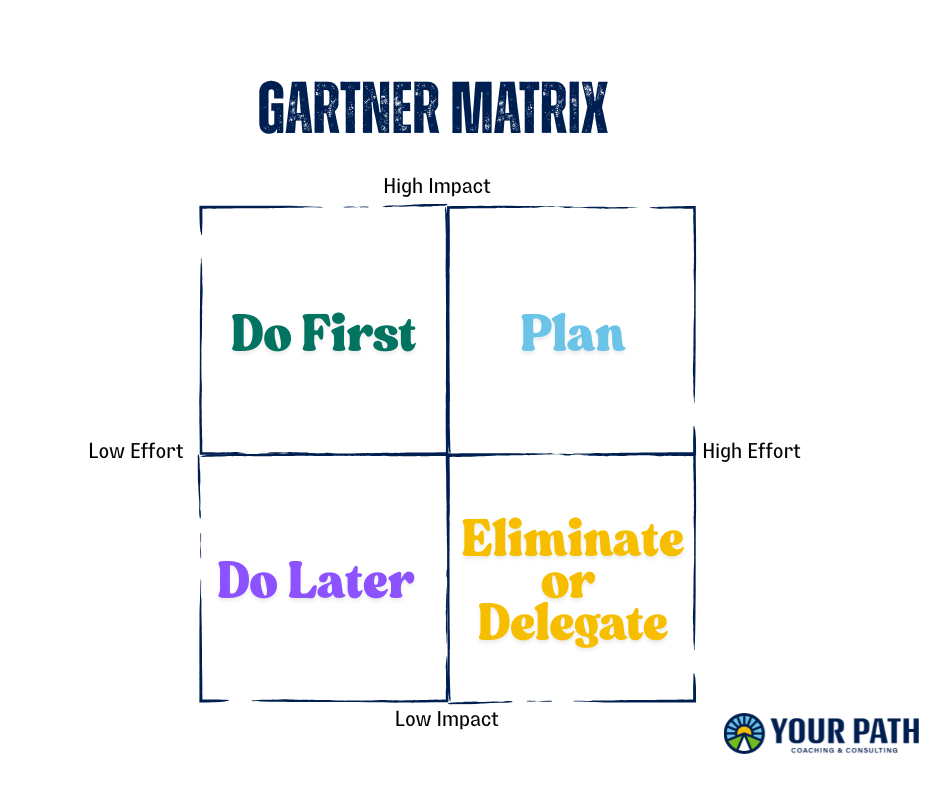
Tasks falling into the "Low Impact, High Effort" quadrant are the strongest candidates for delegation or elimination. Tasks in "High Impact, High Effort" may also be delegated if they don't require the individual's specific expertise.
How to Delegate Effectively (Addressing ADHD Barriers)
Delegation can be challenging due to executive function difficulties with planning and communication, as well as potential emotional barriers such as guilt or perfectionism.
Changing Your Beliefs:
Embrace Asking for Help: Challenge internalized messages that say you need to "do it all." Recognize that seeking support (from family, colleagues, or hired help) is a strength and a form of self-care, not a weakness.
Let Go of Perfectionism ("The Right Way"): Focus on the desired outcome, not on dictating every single step of the process. Allow the person delegated to use their own methods. Micromanaging defeats the purpose and drains energy.
Communicate Clearly and Concisely: Define the task, expected outcome, any constraints, and the deadline. Use direct language. Ask clarifying questions and encourage the other person to do the same. For important tasks, record key details in writing (e.g., email, shared document) to aid memory and clarity.
Choose Appropriately: Match the task to the person's skills and availability.
Provide Necessary Support: Offer any required information, resources, or brief training to ensure the person can succeed.
Build Trust and Show Appreciation: Explain how the delegated task contributes to a larger goal. Express gratitude for the help received.
How to Automate Effectively
Leveraging technology can significantly reduce the burden of routine tasks:
Identify Automation Opportunities: Look for recurring digital tasks: scheduling meetings, paying bills, saving files, responding to standard emails, posting on social media, tracking finances.
Utilize Available Tools: Your phone and other devices you currently use likely have automation features you can leverage. Take time to understand the functionality that you are already paying for.
Finances: Set up automatic bill payments through banks or service providers. Use budgeting apps that automatically categorize spending.
Scheduling: Use online scheduling tools (such as Calendly) to let others book meetings without back-and-forth emails.
Email: Create email filters, rules, and templates (e.g., QuickText ) to manage inbox flow and automate common replies.
Passwords: Use a password manager to store and auto-fill login credentials securely.
Reminders: Set recurring reminders in calendar apps or task managers to keep track of regular chores or check-ins.
Workflow Automation: Explore tools like Zapier or IFTTT to connect different apps and automate multi-step processes.
Simplify and Standardize: Create simple, repeatable processes or checklists for tasks that can't be fully automated but occur regularly.
Delegation and Automation Resources:
ADDitude - Externalize, Delegate, Automate for Executive Function: https://www.additudemag.com/adhd-executive-dysfunction-how-to-be-more-productive-consistent/
Habits & Home - Reducing Clutter and Responsibilities: https://habitsandhome.com/the-best-way-to-improve-your-adhd-working-memory/
Neurodrive - Using the Gartner Quadrant for ADHD Delegation: https://neurodrive.co.uk/using-the-gartner-quadrant-technique-to-improve-delegation-for-adhd
Deliberate Directions - Strategies to Decline, Delegate, Automate: https://deliberatedirections.com/decline-delegate-automate/
Cheryl Susman Coaching - Overcoming ADHD Delegation Panic: https://cherylsusman.com/collected-wisdom/adhd-and-delegating-how-to-stop-the-panic
Conclusion: Building Your Personalized ADHD Toolkit
Navigating life with ADHD involves understanding one's unique brain wiring and actively seeking out strategies that provide support and leverage strengths. We discussed eight approaches in this blog series
Embracing self-compassion
Using the Pomodoro Technique
Practicing body doubling
Utilizing calendars effectively
Designing personalized trackers
Breaking down projects
Implementing reward systems
Delegating or automating tasks
There is no silver bullet for improving your effectiveness. In my work, I find that these strategies work best when they are woven together into an ongoing time-management and prioritization plan. For instance, self-compassion makes it easier to experiment with new techniques, such as the Pomodoro method, without fear of failure. Personalized trackers can reveal patterns that inform which tasks are best suited for body doubling or delegation. Breaking down large projects into smaller, achievable steps creates manageable tasks that can be scheduled on a calendar and potentially motivated by a reward system.
Crucially, there is no single "right" way to manage ADHD symptoms. The most effective approach is highly personalized and must frequently be reassessed and tweaked over time. It requires experimentation, patience, and a willingness to adapt strategies to fit individual needs, preferences, and life circumstances. What works brilliantly one week might need adjustment the next, and that's okay. The goal isn't perfection, but progress and finding sustainable ways to function well.
If ADHD is hindering your productivity, working with an executive coach can help you develop the habits, routines, and skills necessary to focus and follow through more consistently. If you are interested in learning more, schedule a discovery call. We can discuss how we can help you better manage your ADHD.


Comments